Posts

Showing posts with the label esp32

New Sonoff Zigbee Bridge and Sensors hit the FCC - CC2652 based!
Image
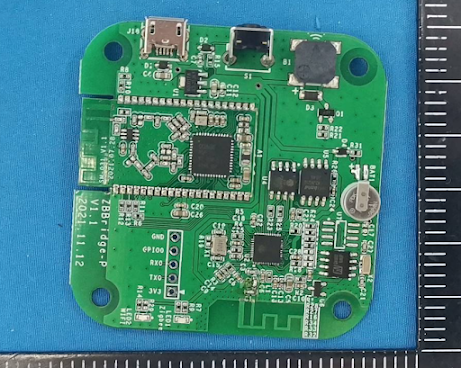
  CC2652 Zigbee Bridge (source: fccid.io) UPDATE: Slated release March 2022 And just like that iTead Sonoff drops the mic and busts out with some new Zigbee gear to hit the FCC to top of the fun of 2021.  I'm really hoping they got them right this time around.  The previous version motion sensor performed rather poorly and was full of issues in my motion sensor round up video.  The door sensor had battery contact issues for some users as well so here's and early drink to them pulling the nose up!   So the really cool thing when I looked at the internal photos was the CC2652 chipset!  NICE!  It might be a little overkill'ish but I do get it from an economy of scale type thing.  Why not do it all CC2652?  The chipset works so well and they've hit a sweet spot with the USB CC2652 series coordinator, so it seems they are going all in with this chipset.   On the release list is the button, temp/humidity sensor, motion sensor, door/w...

DIY Smart Garage Opener LOCAL Shelly Plus

Image
Fully local smart garage opener without relying on the cloud or paying fees to open YOUR garage door.  Full setup and wiring...more below ⚡ Parts Shelly Plus 1  https://s.click.aliexpress.com/e/_ASFDDt Bluetooth Temp Sensors - https://s.click.aliexpress.com/e/_9jN4hg Hardened Door Sensor - https://amzn.to/2ZJZVtm Smaller Door Sensor- https://amzn.to/3romwqw Shelly Plus 1 (Shelly Store) https://bit.ly/3qazTtY Please note, the product links above could be affiliate links, using them could earn digiblurDIY a small commission of most purchases and helps with future video projects. Thank you!  As an Amazon Associate I earn from qualifying purchases. ⚡ Tasmota Templates Setup Shelly Plus 1 Tasmota Setup (all one command/line below): backlog template {"NAME":"ShellyPlus1","GPIO":[320,0,0,0,192,0,1,1,0,0,0,0,1,1,0,0,0,0,0,0,0,32,224,0,0,0,0,0,0,0,0,0,0,0,0,0],"FLAG":0,"BASE":1} ; switchmode1 2 ; Delay 1 ; Module 0 ⚡ Resources Tasmota32 Solo Blu...

Tuya Convert f.0 - Beginners Guide ESP8266 Transplant - TRUE Local Control

Image
How to Easily remove the WB3S, WR3, and other MCUs and replace them with an #ESP8266 module.  Ground up from the tools and techniques to get the job done so you can run #Tasmota, ESPHome, ESPEasy, etc on your device that you paid for!  Keep it local and #GYSOOTC!  ESP8266 Code Burner (Amzn) ESP12F (choice) Hot Air Rework Station (choice) Soldering Iron (Amzn) - https://geni.us/ZUx4vcu or https://geni.us/7O5Ji06 Solder (Amzn) - https://geni.us/N2N1sCv or https://geni.us/WzXJ5dd Flux (Amzn) - https://geni.us/iP8G Toolkit (Amzn) - https://geni.us/X2Kj Blue Tack (Amzn) - https://geni.us/gKnsC Helping Hands (Amzn) - https://geni.us/wOFR6 ⚡Ready to Go Solutions Athom Tasmota ( coupon code DIGIBLUR2 ) - https://www.athom.tech/products How to do Zigbee - https://youtu.be/TV5Qyssa7Ec CloudFree - https://bit.ly/3icyzB6 ⚡Resources How to Flash Tasmota - https://tasmota.github.io/docs/Getting-Started/#flashing How to Flash ESPHome - https://esphome.io/guides/getting_started_hassio....

How to Flash the Wyze Outdoor Plug - ESPHome or Tasmota - Local Control

Image
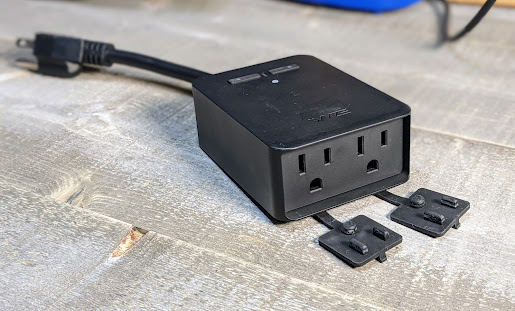
  Features ESP32 for Bluetooth scanning! Higher Gain antenna than a normal ESP module PCB antenna LUX Sensor Power Monitoring (Both relays combined, single channel) Dual Relays Dual Status LEDs IP64 Weather proofing 15 Amp capacity Purchase the Wyze Outdoor Plug (Amazon) First...plot change!  ESPHome is what we are going to use here.  Tasmota could be used but the two buttons would not work since Tasmota does not support the use of enabling pull-down resistors on the ESP32 module. UPDATE: 9.5 Tasmota supports this (template near the end of this article)  Yes, you heard this right, it's an ESP32 just like how the Sonoff Dual R3 came.  Luckily the efuses are not burned and we can use the device how we want, cloudless!  Thanks Wyze!  Dear Wyze, this is a good thing, you'll sell more of these plugs as well as additional word of mouth exposure for the company.  Win win situation, don't screw it up! If you just came for the ESPHome Yaw Mill and don't ca...

Sonoff Dual R3 in wall Smart Switch | ESP32 Power Monitoring & BLE | How to Setup Tasmota

Image
Sonoff iTead Dual R3 with Tasmota - Dual channel power monitoring and BLE scanning. Full guide of setup and even some soldering & flashing how-to tips as a bonus! Power monitoring chip CSE7761 ⚡ Where to Purchase iTead Sonoff Dual R3 (Other stores will be listed when they become available) BLE Sensors (optional) ⚡ Soldering & Others USB On/Off Cable - https://amzn.to/2Nsv26z USB TTL 3.3v - https://amzn.to/2NqtAS2 Hakko Soldering Station - https://amzn.to/3s1xKPm T100 Portable Soldering Iron - https://amzn.to/2NpGPCq Flux - https://amzn.to/2OH3JpC Bluetack - https://amzn.to/3lrod1B Fine 0.015 Solder - https://amzn.to/3lqMrJt Jumpers - https://amzn.to/3cEqLFK CliffQuickTest - https://cloudfree.shop/product/cliff-quicktest-qt1/?ref=digiblur ⚡ Tasmota Template {"NAME":"Sonoff Dual R3","GPIO":[32,0,0,0,0,0,3232,3200,0,576,225,0,0,0,0,0,0,0,0,0,0,7296,7328,224,0,0,0,0,160,161,0,0,0,0,0,0],"FLAG":0,"BASE":1} ⚡ Resources Tasmota ESP32 -...

Wyze Outdoor Plug with Tasmota

Image
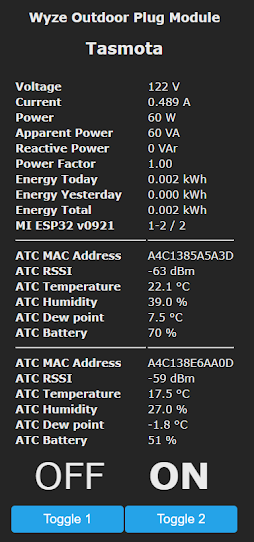
  Just leaving this here...  pretty slick for an outdoor plug at this price point.  It looks like they are currently out of stock though.  I'll be doing more with this soon!   Order on Amazon.com Notify when in Stock from Wyze.com   (no affiliation) UPDATE:  Full flashing article -  https://www.digiblur.com/2021/03/how-to-flash-wyze-outdoor-plug-esphome.html Tasmota 9.5 now supports the buttons on this device -  {"NAME":"Wyze Outdoor Plug","GPIO":[0,0,0,0,0,576,0,0,0,0,0,224,321,7712,7713,320,0,0,0,0,0,2624,2656,2720,0,0,0,0,225,0,4704,0,0,0,0,0],"FLAG":0,"BASE":1} ⚡Products We Use/Recommend Amazon US -  https://amzn.to/2YZNDeO Amazon UK -  https://amzn.to/2TnG2R4 Amazon CA -  https://amzn.to/2JWsNq5 ⚡Be Social!⚡ Discord Chat -  https://discord.gg/bNtTF2v Patreon -  https://www.patreon.com/digiblurDIY Facebook -  https://www.facebook.com/groups/digiblurdiy Instagram -  https://www.instagram.com/digiblur...